

Blog
Shopify Slide Cart Drawer App with Upsells, Rewards & Free Gifts
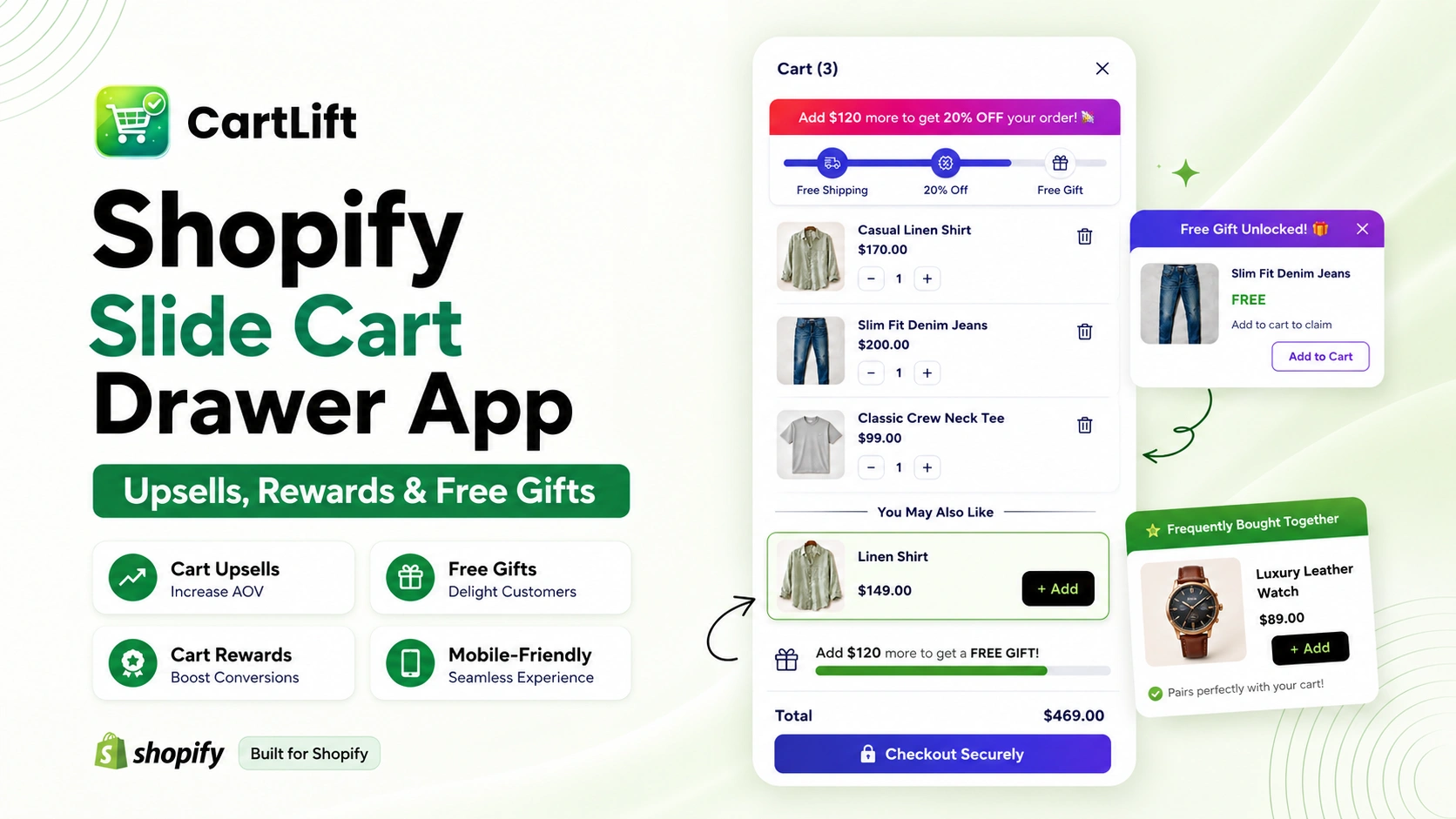
Shopify slide cart drawer app CartLift helps merchants replace a basic cart experience with a faster, mobile-friendly slide cart that can show cart upsells, rewards, free gifts, discount offers, and progress bars before shoppers reach checkout.
When a customer opens the cart, they are already close to buying. That moment should not be treated like a simple order summary. It is an opportunity to guide shoppers toward relevant add-ons, free shipping goals, free gift thresholds, product bundles, and stronger checkout confidence.
CartLift turns your Shopify cart drawer into a conversion-focused shopping layer. Instead of forcing customers to leave the product page or visit a separate cart page, the slide cart appears smoothly, keeps the buying journey active, and gives shoppers clear reasons to add more value to their order.
Create a faster, mobile-friendly slide cart with CartLift and use your cart drawer as a revenue channel, not just a checkout step.
What Makes a Slide Cart Drawer Valuable?
A slide cart drawer is valuable because it lets shoppers review their cart without leaving the current page. For Shopify stores, this creates a smoother buying journey and gives merchants space to promote relevant cart offers, product recommendations, free gifts, discounts, and free shipping progress.
A strong Shopify slide cart drawer app should do three things well: keep the cart easy to access, help customers understand their order, and motivate them to increase cart value without feeling interrupted. CartLift is built around this exact goal.
Why Slide Cart Search Intent Is Different from Normal Cart Search Intent
Merchants who search for a slide cart, cart drawer, side cart, or AJAX cart usually want more than a design change. They are looking for a cart experience that feels modern, opens quickly, works well on mobile, and supports conversion features directly inside the cart.
That is why this page is focused on the term Shopify slide cart drawer app. It matches how store owners describe the feature when they want a cart that slides in from the side, keeps customers on the shopping page, and creates a better path toward checkout.
CartLift supports this intent by combining the slide cart experience with revenue-focused features such as cart upsells, cross-sells, frequently bought together offers, free gifts, rewards, BXGY offers, discount boxes, announcements, and progress bars.
From Passive Cart to Active Cart: The CartLift Approach
A passive cart only displays what the customer already selected. An active cart helps the customer complete a better order. That is the difference CartLift is designed to create.
Instead of showing only product names, quantities, and a checkout button, CartLift gives merchants flexible cart modules that can guide shoppers toward higher-value actions. These actions can include adding a matching product, unlocking a free gift, reaching a free shipping threshold, applying a discount, or discovering a frequently bought together item.
This makes the cart drawer feel useful for the shopper and profitable for the merchant. The customer still controls the buying journey, but the cart becomes more helpful and more persuasive at the right moment.
What a High-Converting Shopify Slide Cart Drawer Should Include
A good slide cart drawer should be simple enough for shoppers to use instantly and flexible enough for merchants to run strong cart campaigns. CartLift gives Shopify stores the core elements needed to create that balance.
- A clean slide cart drawer that opens without sending shoppers away from the current page
- In-cart upsells and cross-sells that recommend relevant products before checkout
- Frequently bought together offers that make add-on purchases easier
- Free shipping progress bars that show shoppers how close they are to a reward
- Free gift and cart reward campaigns based on cart value, quantity, or selected products
- BXGY, BOGO, and discount offers that encourage shoppers to add more
- Cart announcements that highlight promotions, rewards, deadlines, or store messages
- A mobile-friendly layout that keeps the cart easy to use on smaller screens
- Customization controls so the drawer can match your store branding
Why Cart Drawer Upsells Work for Shopify Stores
Cart drawer upsells work because they appear at the right time. The customer is already interested, already browsing the cart, and already close to checkout.
At this stage, a relevant offer can feel helpful instead of disruptive.
For example:
- A fashion store can recommend matching accessories.
- A skincare store can suggest a cleanser with a serum.
- A food store can offer a bundle or bulk discount.
- A home decor store can recommend complementary products.
- A gift store can offer free gift wrapping or a free product.
- A large catalog store can show smart product recommendations.
A cart drawer app helps present these offers naturally inside the buying journey.
CartLift Feature Blocks for Higher Cart Value
1. Slide Cart Drawer
CartLift gives your Shopify store a slide cart drawer that opens quickly and keeps shoppers on the same page. This helps reduce friction because customers can check their cart, adjust quantities, view offers, and move toward checkout without breaking the browsing experience.
For mobile shoppers, this is especially important. A slide cart drawer can feel smoother than a full cart page because the customer does not need to reload the page or lose the product they were viewing.
2. Cart Upsells and Cross-Sells
Cart upsells help you recommend better or additional products inside the cart drawer. Cross-sells help you suggest complementary items that naturally fit with what the shopper already added.
For example, an apparel store can suggest socks, belts, or accessories. A skincare store can suggest a cleanser with a serum. A food store can recommend a bundle or larger pack. CartLift helps make those offers visible at the point where shoppers are already thinking about checkout.
3. Frequently Bought Together Offers
Frequently bought together offers can make the cart feel more personalized and useful. Instead of asking shoppers to keep browsing, you can show related products directly inside the cart drawer and make it easy to add them.
This is a strong tactic for stores with products that naturally work in pairs or routines, such as beauty bundles, fashion accessories, home decor sets, grocery bundles, electronics accessories, and gift sets.
4. Free Shipping Progress Bar
A free shipping progress bar gives shoppers a clear goal. When a customer sees that they are close to unlocking free shipping, they often have a reason to add one more product instead of checking out with a lower order value.
CartLift helps merchants use this motivation directly inside the slide cart drawer. The message can be simple, such as “Add $20 more to unlock free shipping,” but the impact can be powerful because it gives the shopper a visible next step.
5. Free Gifts and Cart Rewards
Free gifts and cart rewards can create a more exciting cart experience. Instead of showing only a subtotal, CartLift lets merchants show reward milestones that encourage shoppers to increase cart value.
A store can offer a free product after a certain cart total, a gift after adding selected products, or a reward after meeting quantity rules. These campaigns make the cart feel more interactive and help shoppers see more value in completing a larger order.
6. BXGY, BOGO, and Discount Offers
Buy X Get Y and BOGO offers are easy for shoppers to understand. They work well because customers can clearly see what they need to add and what they receive in return.
CartLift helps merchants create targeted cart offers based on product, quantity, or cart value. This makes it useful for seasonal promotions, clearance campaigns, bundle deals, gift campaigns, and product launch offers.
7. Announcements and Discount Box
Cart announcements help merchants communicate important messages right where shoppers are making a purchase decision. You can use announcements to promote free shipping, discounts, limited-time offers, gift campaigns, or bundle deals.
A discount box can also improve the cart experience by giving shoppers a clear place to apply coupons without searching for the field later. Small cart details like this can improve trust and reduce confusion before checkout.
Slide Cart Drawer vs Normal Shopify Cart Page
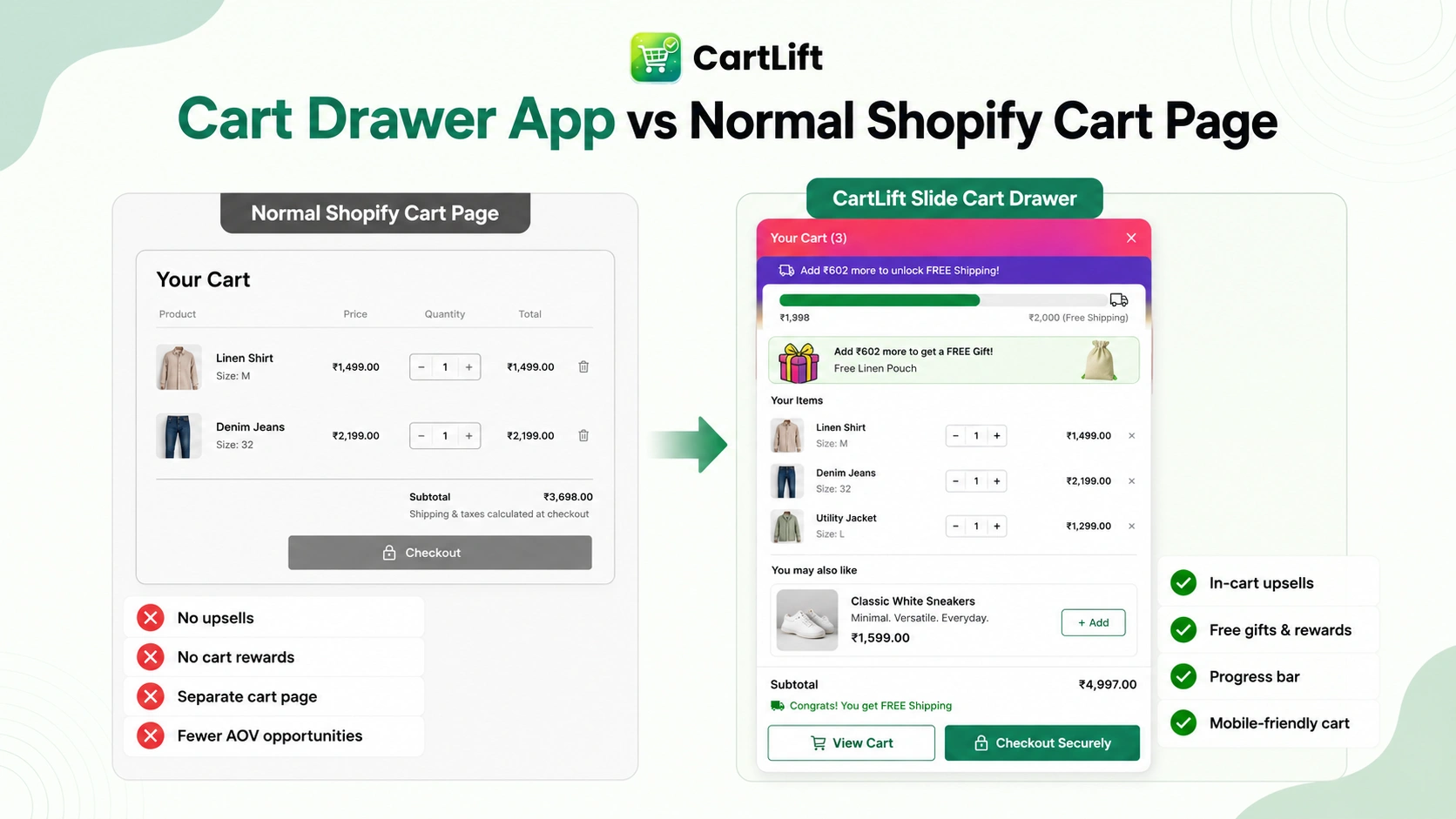
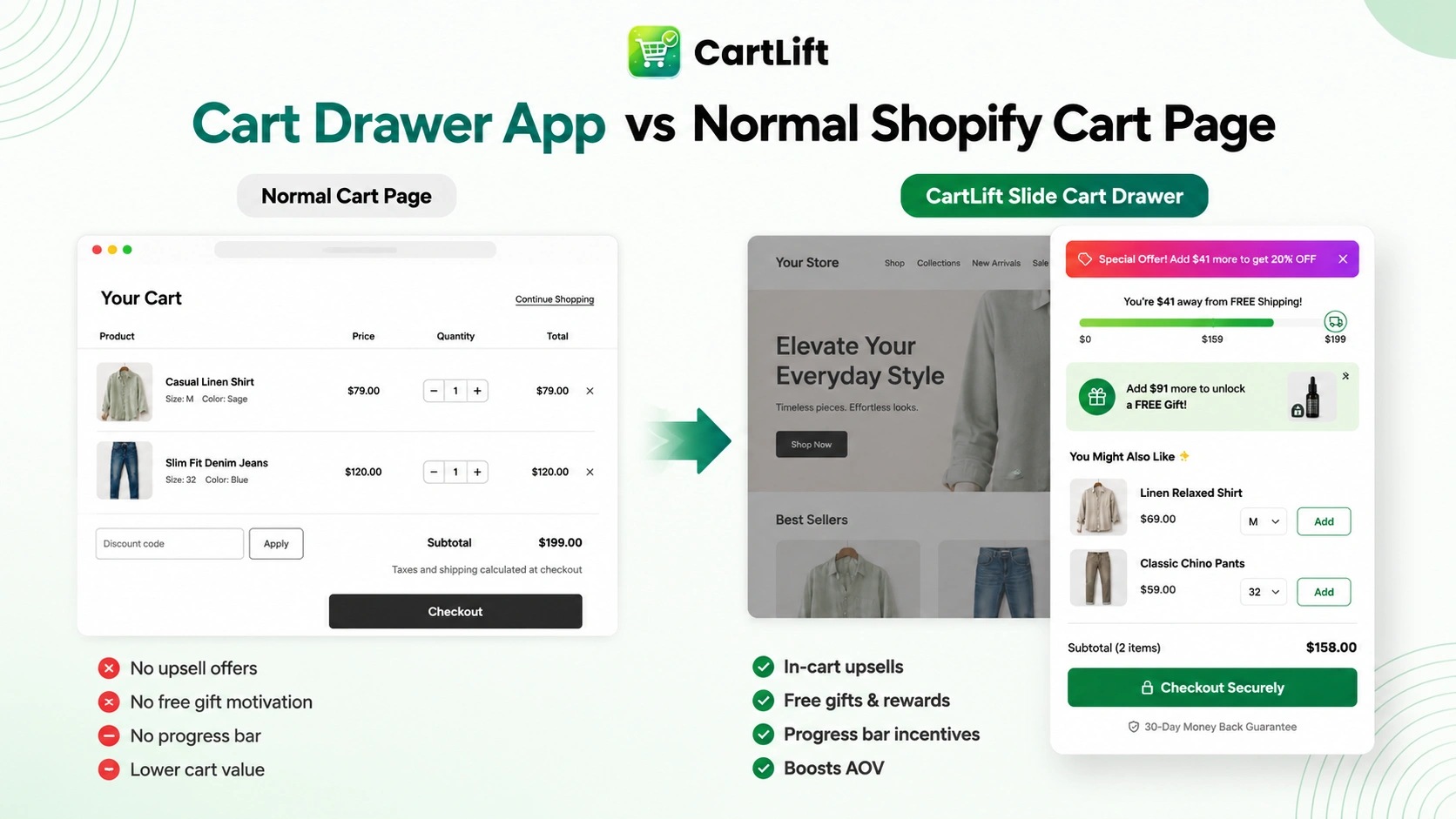
A normal cart page usually acts like a summary page. It tells the shopper what is already in the cart, but it does not always help the shopper discover the next best action. A slide cart drawer can do more because it appears instantly, keeps the customer in the shopping flow, and creates space for offers that increase order value.
| Cart Experience | Normal Shopify Cart Page | CartLift Slide Cart Drawer |
| Page flow | Often loads a separate cart page | Opens on the current page without interrupting browsing |
| Upsell space | Limited or not visible | Shows cart upsells, cross-sells, and recommendations |
| Rewards | Usually not built in | Displays free shipping goals, free gifts, and reward progress |
| Speed of action | Customer may need extra clicks | Customer can add offers and checkout from the drawer |
| Mobile experience | Can feel slower or disconnected | Designed for a smooth mobile cart experience |
| Revenue role | Acts like an order summary | Works like a mini conversion funnel before checkout |
The Slide Cart Conversion Framework
To make a Shopify slide cart drawer perform well, it should be built around a simple conversion framework. CartLift supports this framework by helping merchants guide shoppers through a clear sequence inside the cart.
Step 1: Confirm the cart
The shopper should immediately see what they added, the quantity, the price, and the cart total. This creates clarity and reduces hesitation.
Step 2: Show the next reward
The cart should show a visible goal, such as free shipping, a free gift, or a discount threshold. This gives the customer a reason to keep adding value.
Step 3: Recommend the next best product
Relevant cart upsells and cross-sells should appear while the shopper is already reviewing the cart. The offer should feel connected to the products already selected.
Step 4: Make the action easy
The customer should be able to add the recommended product, apply an offer, or move to checkout without leaving the cart drawer.
Step 5: Keep checkout visible
The checkout button should remain clear and accessible. The goal is to increase order value without making the purchase path feel complicated.
Offer Ideas You Can Run with CartLift
CartLift can support many cart-based campaigns. Here are practical offer ideas that Shopify merchants can use to turn the slide cart drawer into a stronger sales channel.
Fashion and Apparel
- Add a matching accessory when a customer adds a dress, shirt, shoes, or jacket.
- Offer “Buy 2, get 1” style deals for basics, socks, or seasonal items.
- Use a free shipping progress bar to encourage one more clothing item before checkout.
Beauty and Skincare
- Recommend a complete routine, such as cleanser plus serum plus moisturizer.
- Offer a free sample or mini product when the cart reaches a set value.
- Use cart rewards to promote bundles, refill packs, or high-margin add-ons.
Food and Grocery
- Suggest bulk packs, snack bundles, or complementary products in the cart.
- Create quantity-based rewards for pantry products or recurring essentials.
- Use free shipping thresholds to encourage larger basket sizes.
Home and Lifestyle
- Recommend matching decor items, candles, cushions, or accessories.
- Use a gift-with-purchase campaign for premium home collections.
- Promote cart bundles for rooms, themes, or seasonal decor campaigns.
Gifts and Seasonal Stores
- Offer gift wrapping as a one-click add-on inside the cart drawer.
- Show a free gift campaign during holidays, launches, or limited-time events.
- Use announcements to promote shipping deadlines or seasonal offers.
How CartLift Helps Merchants Reach More Customers
Better cart experiences can support stronger customer reach because they improve the way shoppers interact with the store after they show purchase intent. If a customer adds one product and then sees useful recommendations, clear rewards, and helpful cart messages, the store has more opportunities to increase engagement before checkout.
CartLift also helps merchants promote more of their catalog. Upsells, cross-sells, and frequently bought together offers can introduce shoppers to products they may not have discovered through navigation alone. This is especially useful for stores with large catalogs or products that work best as sets, kits, routines, or bundles.
Instead of relying only on product pages, collection pages, or ads, CartLift gives merchants another place to surface relevant products. This can help increase product visibility inside the store and encourage shoppers to explore more value before completing the order.
Why CartLift Is Built for Mobile-First Shopping
Many Shopify customers browse on mobile devices, so the cart experience must be simple, responsive, and fast. A slide cart drawer helps by keeping the cart accessible without forcing the shopper through a full page transition.
CartLift is designed to support a clean mobile cart drawer where shoppers can review products, see rewards, add recommended items, and checkout with fewer interruptions. This is important because mobile shoppers are often less patient with slow or complicated cart flows.
BOOST CART VALUE BEFORE CHECKOUT
Create a Faster, Mobile-Friendly Slide Cart with CartLift
When Should You Use a Shopify Slide Cart Drawer App?
A Shopify slide cart drawer app is useful when your store wants to improve the cart experience and make the cart more conversion-focused. It is especially useful when your store already receives traffic but average order value is not growing as much as expected.
You should consider using CartLift if:
- Customers often buy only one item even when you sell complementary products
- Your store has free shipping thresholds but customers do not always reach them
- You want to promote free gifts, rewards, or discounts inside the cart
- Your cart page feels too basic or disconnected from the shopping journey
- You want a mobile-friendly cart drawer without heavy custom development
- You want to run cart upsell campaigns without relying on multiple separate apps
How to Set Up a Strong Slide Cart Strategy with CartLift
A strong slide cart strategy starts with choosing the right cart offer. The best offer depends on your product catalog, margins, order value, and customer buying behavior. CartLift gives merchants the flexibility to test different cart campaigns and improve the cart experience over time.
- Choose the primary cart goal, such as increasing AOV, promoting free shipping, offering free gifts, or selling add-on products.
- Select the cart modules you want to show, such as upsells, rewards, discount box, announcements, or progress bars.
- Create rules based on cart value, quantity, selected products, or campaign goals.
- Customize the cart drawer design so it matches the store brand and feels native to the theme.
- Review the cart experience on mobile and desktop before launching.
- Track how customers respond and improve offers based on performance.
Cart Drawer Copy Examples Merchants Can Use
Clear cart messaging can make offers easier to understand. Here are example messages that can work well inside a slide cart drawer.
- “Add $25 more to unlock free shipping.”
- “You are one product away from a free gift.”
- “Complete your routine with these recommended products.”
- “Buy 2 and get 1 free on selected items.”
- “You may also like these best sellers.”
- “Add this matching item before checkout.”
- “Unlock your next reward by increasing your cart value.”
SEO Benefits of Better Cart and Offer Visibility
A slide cart drawer is mainly a conversion feature, but it can also support broader store growth by improving how shoppers discover products and interact with your catalog. When more products are promoted inside the cart, customers have more chances to view related products, explore add-ons, and understand bundle value.
For content and SEO pages like this one, the important terms are naturally connected to merchant search intent: Shopify slide cart drawer app, slide cart, cart drawer, cart rewards, free gifts, cart upsells, in-cart upsells, free shipping progress bar, and boost AOV. These terms describe exactly what merchants are trying to add to their store.
Why Choose CartLift?
CartLift is designed for Shopify merchants who want a practical slide cart drawer app that supports both cart design and cart revenue features. It brings together the tools merchants commonly need to create a stronger cart experience: cart upsells, cross-sells, frequently bought together offers, cart rewards, free gifts, discounts, announcements, BXGY offers, BOGO offers, and free shipping progress bars.
Instead of using the cart only as a checkout step, CartLift helps turn it into a strategic part of your store. The app is useful for merchants who want to increase average order value, improve product discovery, promote cart rewards, and create a smoother shopping experience before checkout.
Key Benefits of CartLift
- Create a faster slide cart drawer for Shopify shoppers
- Show cart upsells and cross-sells before checkout
- Promote frequently bought together products
- Use cart rewards and free gifts to encourage larger orders
- Display free shipping progress bars and reward milestones
- Create BXGY, BOGO, discount, and targeted cart offers
- Customize the drawer, announcements, rewards, and offer design
- Keep the cart accessible from anywhere on the store
- Build mobile-friendly cart campaigns without custom coding
- Turn the cart drawer into a revenue-focused conversion channel
FAQ
A normal cart page usually opens as a separate page. A slide cart drawer opens on the same page, which helps shoppers stay in the buying flow. With CartLift, the drawer can also show cart upsells, free gifts, cart rewards, and free shipping progress bars.
CartLift is useful for Shopify stores that want to improve cart experience, increase average order value, promote free gifts, show cart rewards, display product recommendations, and create a faster checkout path.
CartLift is a strong Shopify cart drawer upsell app for merchants who want cart upsells, free gifts, rewards, progress bars, BXGY offers, and cart drawer customization in one solution.
TURN YOUR CART INTO A REVENUE CHANNEL
Create a Faster, Mobile-Friendly Slide Cart with CartLift
Create a faster, mobile-friendly slide cart with CartLift and turn your Shopify cart drawer into a revenue-focused channel. Add in-cart upsells, product recommendations, free gifts, cart rewards, discounts, BXGY offers, and progress bars that encourage shoppers to add more before checkout.
Install CartLift and build a smarter Shopify slide cart drawer that helps improve the shopping experience and increase average order value.