

Blog
Shopify Slide Cart Drawer App with Upsells, Rewards & Free Gifts
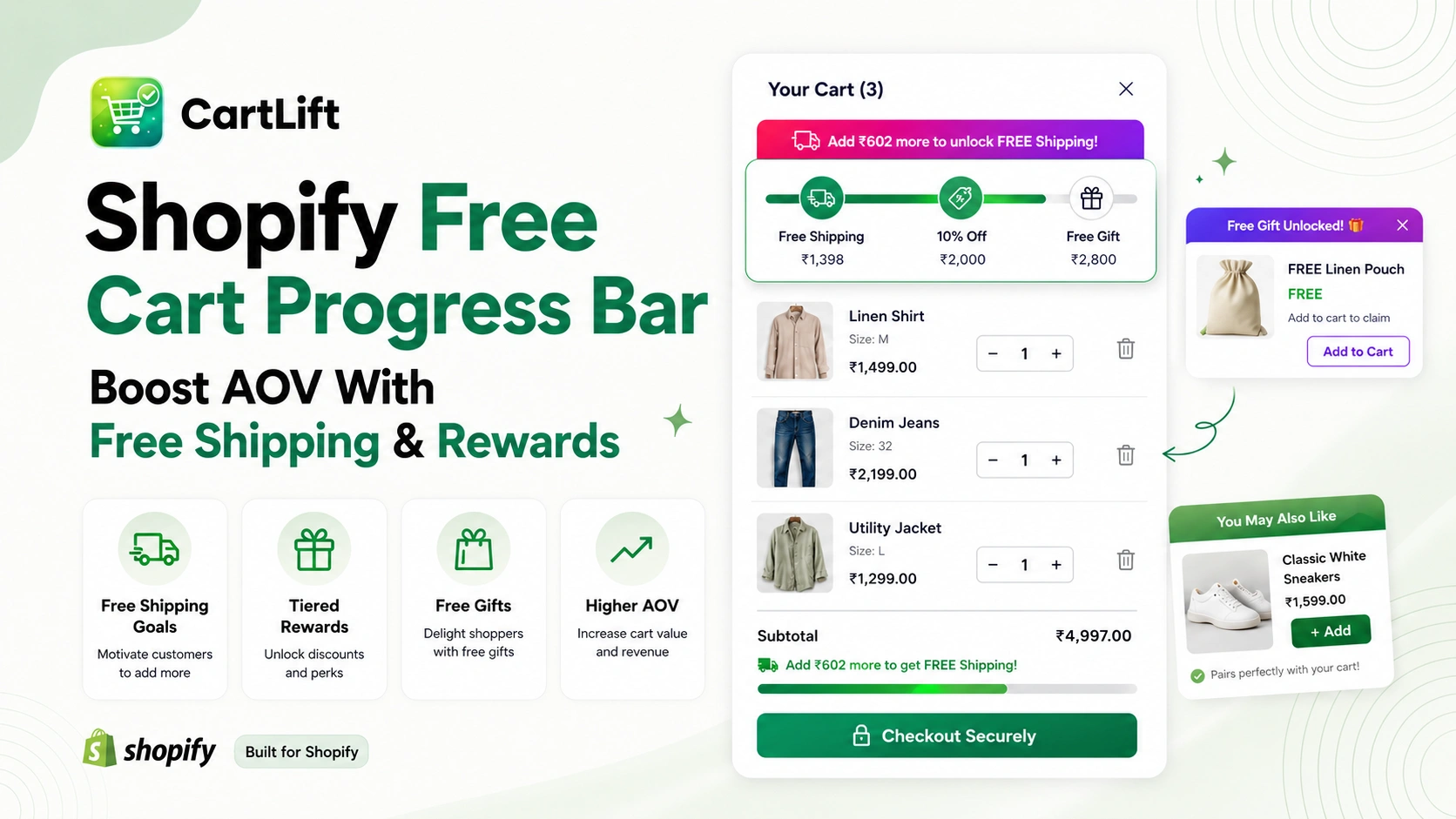
A Shopify free cart progress bar gives shoppers a visible reason to keep building their order before checkout. Instead of showing a static message such as “Free shipping over $75,” a progress bar shows how close the cart is to the next reward and updates as products are added or removed.
For Shopify merchants, that simple visual goal can become a practical average order value strategy. A progress bar can lead customers toward free shipping, a free gift, a discount, or multiple reward tiers while the cart drawer also presents complementary products and other relevant offers.
CartLift: Cart Drawer & Upsell brings these conversion tools into one customizable slide cart. The app currently includes a free shipping progress bar, multi-tier rewards with free gifts based on cart value, cart upsells, product recommendations, BXGY/BOGO offers, discounts, announcements, and targeted offers based on products, quantity, or cart value.
What Is a Shopify Free Cart Progress Bar?
A slide cart drawer is valuable because it lets shoppers review their cart without leaving the current page. For Shopify stores, this creates a smoother buying journey and gives merchants space to promote relevant cart offers, product recommendations, free gA Shopify free cart progress bar is a visual cart element that measures a shopper’s current cart value or qualifying progress against a defined reward threshold. As the cart grows, the bar fills and the message can change from a prompt such as “You are $18 away from free shipping” to a success message once the goal is reached.
The same concept can go beyond shipping. A store can use cart progress to unlock a free gift, a percentage discount, a special offer, or a second and third reward tier. This turns the cart from a passive order summary into an interactive merchandising space.
Shopify supports free shipping discounts with minimum purchase requirements, so merchants can build reward thresholds around real store rules. A cart progress bar makes those requirements easier for shoppers to understand before they reach checkout.
ifts, discounts, and free shipping progress.
A strong Shopify slide cart drawer app should do three things well: keep the cart easy to access, help customers understand their order, and motivate them to increase cart value without feeling interrupted. CartLift is built around this exact goal.
Why a Shopify Cart Progress Bar Can Help Increase AOV
Average order value increases when shoppers have a clear and relevant reason to add more to an order. A cart progress bar does not guarantee a higher AOV, but it can make the next incentive visible at the exact moment a customer is deciding whether to add another product or proceed to checkout.
Turn a Hidden Threshold Into a Clear Goal
A free shipping rule may already exist in the store, but shoppers cannot act on a threshold they do not notice. A progress bar translates the rule into a simple live message: how much has been earned, how much remains, and what happens when the goal is reached.
Create a Natural Reason to Add One More Item
If a shopper is close to a reward, a small additional purchase can feel more purposeful. That is where cart upsells and product recommendations become especially useful. The progress bar provides the motivation, while the recommendation gives the shopper an easy way to reach the target with something relevant.
Reward Higher-Value Carts Without Discounting Everything
Free shipping, gifts, and tiered rewards can add perceived value without reducing every product price. For stores that want to protect pricing while still encouraging larger baskets, a reward-led cart can be a useful alternative to running a permanent sitewide percentage discount.
Keep the Incentive Visible Until Checkout
Because CartLift uses a slide cart drawer, the reward goal can stay connected to the buying flow. Customers can review products, see the current progress, discover an upsell, apply a discount, and move toward checkout without navigating to a separate cart page.
BOOST CART VALUE BEFORE CHECKOUT
Turn Your Cart Goal Into a Revenue Opportunity
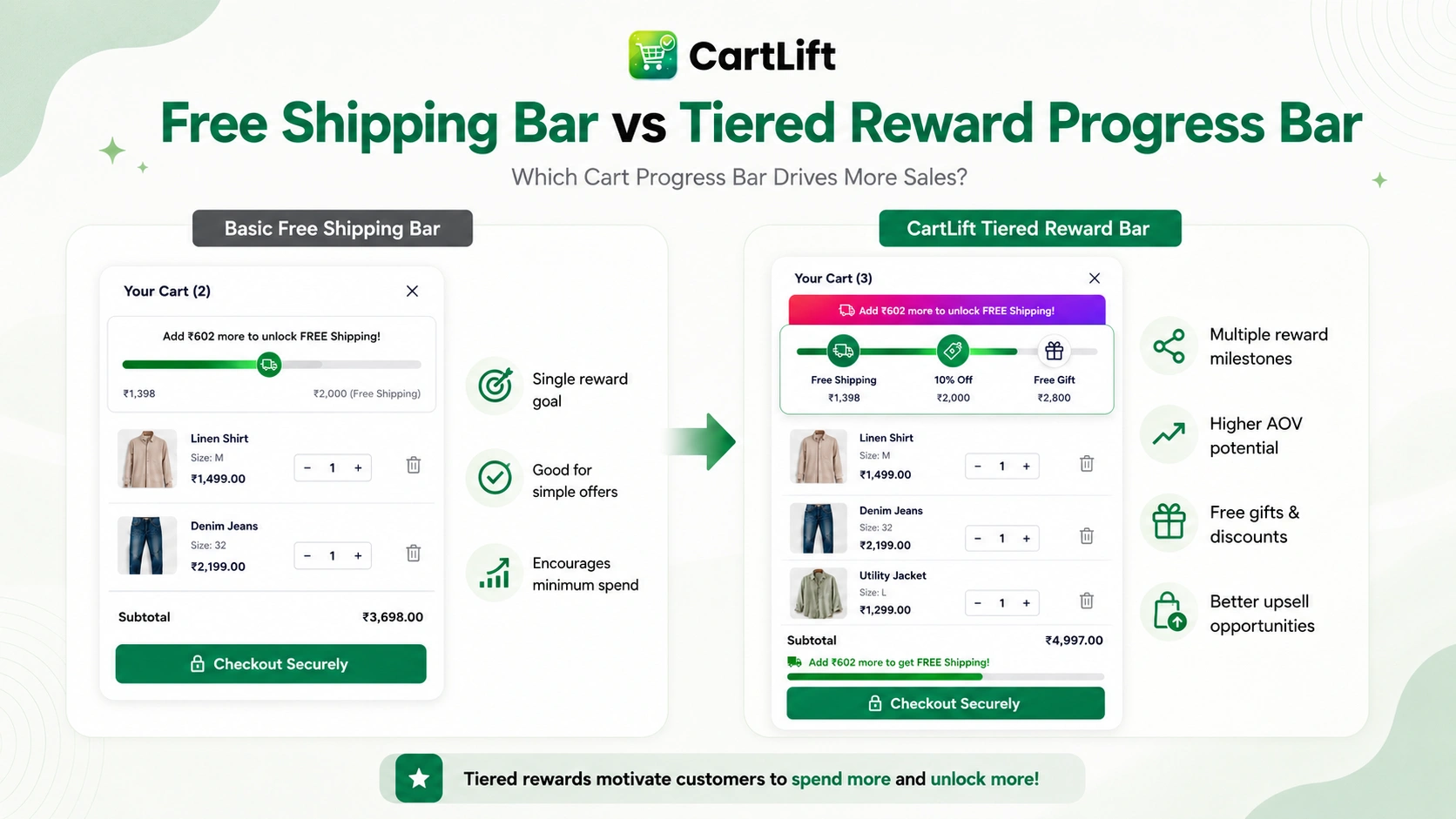
Free Shipping Progress Bar vs. Cart Reward Progress Bar
A free shipping progress bar and a broader cart reward bar use the same basic idea, but the incentive can be different. The strongest setup depends on your margins, shipping costs, catalog, and typical order behavior.
| Approach | How it works | Best use case |
| Free shipping progress bar | Shows the amount remaining until shipping becomes free. | Stores where shipping cost is a strong purchase consideration. |
| Free gift progress bar | Unlocks a gift after a defined cart-value threshold. | Brands that can use samples, accessories, or complementary products as incentives. |
| Discount reward bar | Unlocks a discount after a cart goal is reached. | Campaigns where a price-based incentive fits the promotion. |
| Multi-tier reward bar | Unlocks several rewards at increasing cart values. | Stores that want to keep giving shoppers a next goal as the cart grows. |
How Multi-Tier Cart Rewards Work
A single threshold can motivate one extra purchase, but a multi-tier progress bar can keep the momentum going after the first reward is unlocked. Instead of ending the experience at free shipping, the cart can reveal another goal such as a free gift or a higher-value reward.
For example, an illustrative reward ladder might look like this:
Cart value | Reward | Cart message | Merchandising goal |
$50 | Free shipping | Only $12 more for free shipping | Move a smaller cart toward the first threshold |
$75 | Free gift | Gift unlocked – next reward at $100 | Add perceived value with a complementary product |
$100 | Extra reward or offer | Top reward unlocked | Give larger carts another reason to keep building |
These numbers are only examples. The right thresholds should reflect the store’s existing cart behavior, margins, shipping economics, and the actual value of the reward. The objective is to create an achievable next step rather than a target that feels unrealistic.
How CartLift Builds a Progress-Based Shopify Cart
- Free shipping progress bar to show how close the cart is to the shipping threshold.
- Multi-tier progress bar that can unlock free gifts based on cart total value.
- Targeted offers based on products, quantity, or total cart value.
- Cart upsells, cross-sells, product recommendations, and frequently bought together offers.
- BXGY and BOGO promotions for product- and quantity-led incentives.
- Discounts, announcements, rewards, and a discount box inside the cart drawer.
- Customizable cart drawer styling and mobile-friendly campaigns without theme-code edits.
How to Add a Shopify Free Cart Progress Bar With CartLift
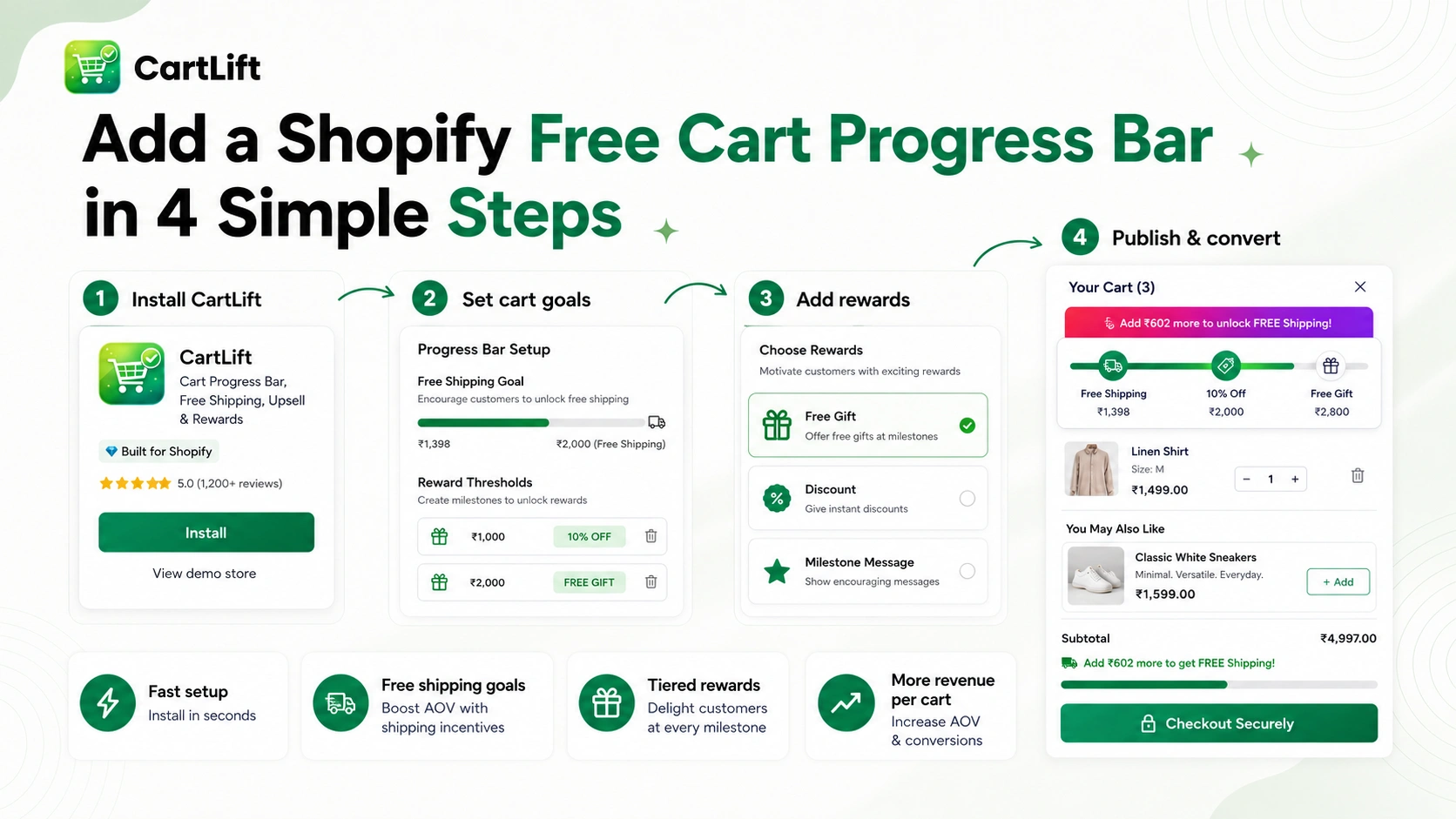
The exact configuration depends on the campaign you want to run, but the strategic setup can stay simple. Start with one clear reward goal, make sure the threshold matches the actual promotion in Shopify, and then add more tiers or cart offers only when they improve the buying experience.
Step 1: Install CartLift and Open the Cart Drawer Settings
Install CartLift: Cart Drawer & Upsell from the Shopify App Store and open the app from your Shopify admin. The app is designed to work as a slide cart drawer, so begin by making sure the drawer style and core cart experience fit your storefront.
Step 2: Choose the First Reward Goal
Decide what the shopper should unlock first. Free shipping is often a simple starting point because the value is easy to understand. If your store already uses a free shipping minimum, the progress bar should mirror that real threshold so the message in the cart remains accurate.
Step 3: Configure the Progress Message
Use clear language that tells the shopper what remains. Messages such as “You are $15 away from free shipping” or “Add $20 more to unlock your free gift” are more actionable than a generic “Rewards available” banner. When the reward is unlocked, switch to a positive completion message.
Step 4: Add Additional Reward Tiers
If your campaign can support more than one incentive, add tiers in a logical order. For example, free shipping can be the first goal, a free gift can be the second, and a larger reward can sit at the highest threshold. CartLift’s multi-tier progress bar is designed for free gift rewards based on cart total value.
Step 5: Add Relevant Upsells Near the Goal
A progress bar works best when customers can easily find something useful to add. Use product recommendations, cross-sells, or frequently bought together suggestions that complement products already in the cart. Avoid filling the drawer with unrelated products simply to chase a higher order value.
Step 6: Test the Full Cart Experience
Test the cart on desktop and mobile before publishing the campaign. Add and remove products, cross each reward threshold, verify that the displayed message matches the actual promotion, and make sure discounts, gifts, shipping rules, and checkout behavior remain consistent.
BOOST CART VALUE BEFORE CHECKOUT
Launch Free Shipping & Reward Goals Without Rebuilding Your Theme
Combine Free Shipping With Free Gifts and Discounts
A free shipping progress bar can be the entry point, but it does not have to be the only incentive. CartLift supports multiple cart-conversion features, so merchants can build a reward journey that matches the economics of the store.
Free Shipping as the First Milestone
Free shipping is familiar and easy to communicate. Shopify allows merchants to configure free shipping with minimum purchase requirements, which means the progress message can reflect a real qualification rule instead of acting as a decorative banner.
Free Gift as the Next Milestone
A free gift can make the next threshold feel more exciting after shipping has already been unlocked. The strongest gifts are usually relevant to the cart: a sample, accessory, small add-on, trial size, or complementary item that introduces another product without distracting from the purchase.
Discounts for Campaign-Specific Rewards
A discount tier can work for seasonal events, VIP campaigns, or higher-value carts. Shopify supports amount-off, free shipping, and Buy X Get Y discount structures, and CartLift can present discount-led offers alongside other cart incentives. Always test discount combinations so the final checkout total matches the message shown in the cart.
Use BXGY and BOGO When the Goal Is Product Quantity
Not every reward needs to be based only on cart value. CartLift supports BXGY and BOGO offers, which can be useful when the objective is to increase units per order. Shopify’s Buy X Get Y discount rules can also use minimum quantity or minimum purchase requirements, so the cart message should be written around the condition customers actually need to meet.
Static Free Shipping Message vs. Shopify Cart Progress Bar
A static announcement can tell shoppers that free shipping exists, but it does not show personal progress. A dynamic progress bar changes the message according to the current cart, which can make the incentive more concrete and easier to act on.
| Cart experience | Static message | Progress bar experience |
| Personalization | Same message for every cart | Updates based on current progress |
| Goal clarity | Mentions the offer | Shows the amount remaining |
| Reward tiers | Usually one announcement | Can guide shoppers through multiple milestones |
| Upsell connection | Separate from recommendations | Can work beside upsells and product recommendations |
| Completion feedback | May not change | Can celebrate when a reward is unlocked |
Best Practices for a Shopify Free Cart Progress Bar
A progress bar is most effective when the reward structure is simple enough to understand immediately and valuable enough to influence the next cart decision. Use the following principles when planning your campaign.
- Match the progress threshold to the real shipping, gift, or discount rule used by the store.
- Keep the first goal achievable. Consider placing it modestly above the cart value customers commonly reach instead of setting an arbitrary high target.
- Use short, specific messages that explain both the remaining amount and the reward.
- Choose free gifts that are relevant to the products shoppers are already buying.
- Use two or three meaningful tiers rather than creating so many milestones that the cart becomes confusing.
- Pair progress with complementary upsells that can reasonably help the shopper reach the next goal.
- Test mobile spacing carefully because the progress bar, rewards, discount field, product recommendations, and checkout button all compete for limited cart-drawer space.
- Check discount combinations and gift logic before launch so cart messaging and checkout results stay consistent.
- Review performance over time and adjust thresholds, rewards, and recommendations based on actual store results.
Shopify Cart Progress Bar Examples
The best cart reward strategy depends on the business model. These examples show how the same progress concept can be adapted to different stores. The values below are illustrative rather than universal recommendations.
Example 1: Fashion Store
A fashion store could unlock free shipping at the first threshold, then offer a low-cost accessory or care item as a second reward. The cart drawer can recommend socks, belts, or other complementary products to help the shopper reach the next goal naturally.
Example 2: Beauty and Skincare
A beauty brand could use a sample or travel-size product as a free gift tier. This can introduce shoppers to another product line while the progress bar turns the sample into a visible reason to increase the basket.
Example 3: Home and Lifestyle
A home store might combine free shipping with frequently bought together recommendations. A customer buying a primary product can see smaller complementary items in the cart while the progress bar shows how those additions move the order toward the reward.
Example 4: Seasonal Sale
During a seasonal campaign, a merchant could use a free shipping threshold followed by a limited-time gift or discount. An announcement inside the cart can explain the campaign while the progress bar shows the shopper’s current status.
Why Use CartLift for Shopify Cart Progress Rewards?
The main advantage of CartLift is that the progress bar does not sit alone. It is part of a larger cart drawer system, which means the merchant can coordinate the reward goal with recommendations, upsells, BXGY offers, gifts, discounts, and cart customization from the same app.
- Build free shipping and reward progress directly into the slide cart experience.
- Create multi-tier free gift rewards based on cart total value.
- Target offers using products, quantity, or cart value.
- Add upsells, cross-sells, and frequently bought together recommendations close to the reward goal.
- Use BXGY, BOGO, discounts, announcements, and rewards in the same cart workflow.
- Customize the cart drawer and launch mobile-friendly campaigns without manual theme-code edits.
At the time of writing, CartLift is listed as Free on the Shopify App Store. Merchants should check the current listing before publishing pricing-related statements because app pricing and plan details can change.
BOOST CART VALUE BEFORE CHECKOUT
Build a Smarter Shopify Cart Around Every Reward Goal
Who Should Use a Shopify Cart Progress Bar?
A Shopify free cart progress bar can be useful for stores that already have a threshold-based promotion or want to create a more structured cart reward strategy. It is especially relevant for:
- Stores that offer free shipping above a minimum order value.
- Brands that can use samples, accessories, or low-cost complementary items as free gifts.
- Merchants trying to increase average order value without relying only on storewide discounts.
- Stores with strong cross-sell or frequently bought together opportunities.
- Seasonal campaigns that need free gifts, BOGO/BXGY, or cart-value incentives.
- Mobile-first stores that want the reward and upsell experience inside a compact slide cart.
FAQ's About Shopify Free Cart Progress Bars
A Shopify free cart progress bar is a visual indicator inside the cart that shows how close a customer is to a reward threshold, such as free shipping, a free gift, or a discount. It updates as the cart changes so the shopper can see the remaining amount needed to unlock the reward.
A progress bar does not guarantee a higher average order value, but it can make reward thresholds more visible and give shoppers a clear reason to add another relevant item. The impact depends on the threshold, reward, products, traffic, and overall store experience.
Yes. Shopify can support free shipping rules with minimum purchase requirements, and a cart app can display progress toward that threshold. CartLift includes a free shipping progress bar as part of its slide cart drawer.
Yes. CartLift includes a multi-tier progress bar and supports free gifts based on cart total value. Merchants can structure the campaign around more than one reward milestone when the economics and customer experience support it.
Yes. A free gift can be used as a reward after a defined cart-value goal. CartLift supports free gifts and multi-tier reward progress, making it possible to combine shipping and gift incentives inside the cart.
Yes. CartLift supports cart upsells, cross-sells, product recommendations, and frequently bought together offers. These can be useful near a reward threshold because they give shoppers relevant products they can add to reach the next goal.
Yes. CartLift lists BXGY and BOGO offers among its current cart-conversion features. These can complement cart-value rewards when a campaign is based on product quantity or specific qualifying items.
At the time of writing, CartLift: Cart Drawer & Upsell is listed as Free on the Shopify App Store. Because app plans can change, check the current listing before publishing or promoting pricing details.
There is no universal threshold. Review your normal cart values, shipping costs, gross margins, and promotional goals. A useful threshold should be achievable enough to motivate an additional purchase while still making financial sense for the store.
For many stores, a small number of clear tiers is easier to understand than a long reward ladder. Start with one primary goal and add another tier only when the additional reward is meaningful and the cart remains easy to scan on mobile.
Use a Shopify Free Cart Progress Bar to Make Every Cart Goal Clearer
TURN YOUR CART INTO A REVENUE CHANNEL
Ready to Create Your Shopify Free Cart Progress Bar?
Install CartLift and build free shipping goals, tiered rewards, free gifts, and cart upsells that give shoppers a clear reason to add more before checkout.