



Boost AOV with an All-in-One Shopify Cart Drawer App


CartLift
The Problem
Your cart should do more than hold products
Most Shopify carts are passive. They collect items, then send customers to checkout.
That means missed opportunities:
no upsell at the decision stage
no spend-more incentive
no free gift trigger & no smart discount logic
no reason for shoppers to increase cart value
The outcome
What CartLift helps you do?
Increase average order value
Reward bigger purchases
Simplify promotions
Feature Highlights
Everything you need inside one cart drawer app
Smart cart upsells
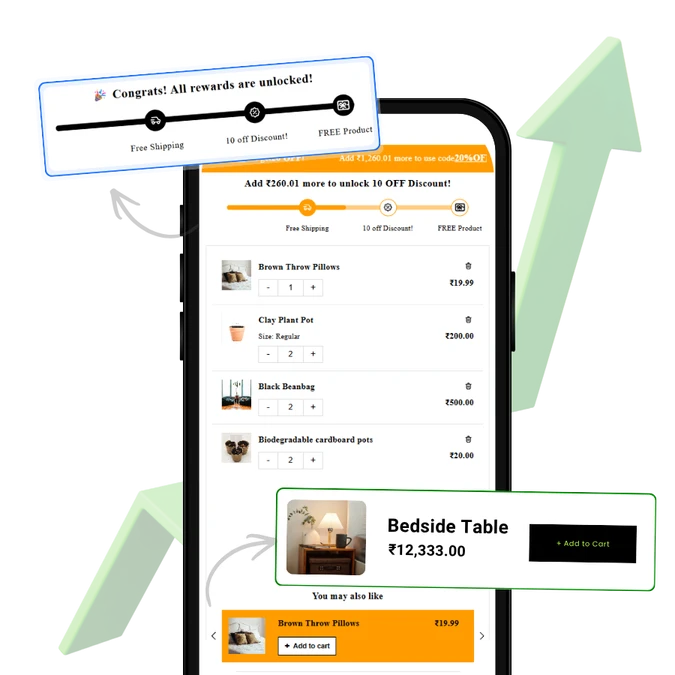
Recommend products based on cart conditions like item count, cart value, or specific products.
Automatic and code-based discounts
Run flexible promotions with discount rules that match your selling strategy.
Free gifts and Buy X Get Y
Motivate bigger checkouts with reward-style offers customers immediately understand.
Free shipping progress bar
Push shoppers toward a higher spend threshold with a visible reward target.
Conditional shipping rules
Add more control over how shipping incentives are shown and triggered.
Customizable slide cart
Tailor announcements, gift wrap options, discount fields, and cart design to fit your storefront.
Why This Converts
Why merchants use cart drawers to increase conversions
- shoppers stay on-page
- offers appear at a high-intent moment
- spending goals are easier to communicate
- checkout feels faster and more guided
Use Cases
Built for the promotions that actually move revenue
Upsell in cart
Suggest matching or higher-value products before checkout.
Free gift campaigns
Buy X Get Y offers
Shipping goal campaigns
Seasonal discount pushes
Comparison-style positioning without naming rivals
Why merchants choose an all-in-one cart strategy
Many Shopify merchants use separate apps for:
- cart drawer
- discount logic
- free gift campaigns
- upsells
- free shipping bars
Soft cross-sell to Fomoify
Want even better conversion performance?
CartLift lifts order value inside the cart.
Fomoify can strengthen the conversion journey before shoppers even reach the cart by adding social proof and urgency signals like sales notifications and visitor activity. Used together, the two apps cover both conversion rate and AOV. Fomoify’s current app page lists recent purchase notifications, visitor activity, low stock alerts, add-to-cart notifications, review notifications, and flash sale popups.
Need correct citation for Fomoify from prior turn unavailable?
Can’t cite prior turn? We have current sources only. Need search fomoify. Let’s do quick.
How it works
How CartLift works ?
Step 1:
Install the app and enable your cart drawer
Step 2:
Set your upsells, rewards, gifts, and discount rules
Step 3:
Customize the cart look, content, and incentives
Step 4:
Launch a cart experience designed to lift AOV